
What Is an RSA Key: Explanation, Generation, and Use Cases
Summary RSA keys are the backbone of modern internet security, enabling everything from secure website connections to encrypted messaging. This article breaks down what RSA keys are, how to generate t...
Summary
RSA keys are the backbone of modern internet security, enabling everything from secure website connections to encrypted messaging. This article breaks down what RSA keys are, how to generate them using common tools, and where they are used in your daily digital life.
What Is an RSA Key: Explanation, Generation, and Use Cases
In the vast landscape of digital security, few concepts are as fundamental as the RSA key. Whether you're logging into a remote server, signing a digital document, or just browsing a banking website, there's a good chance RSA encryption is working behind the scenes to keep your data safe. But what exactly is it, and how does it work?
What Is an RSA Key?
An RSA key is actually not a single key, but a key pair consisting of two mathematically linked components: a Public Key and a Private Key. This system is known as asymmetric cryptography.
- The Public Key: As the name suggests, this key can be shared openly with anyone. It is used to encrypt data. You can think of it like an open padlock that anyone can snap shut.
- The Private Key: This key must be kept secret and never shared. It is used to decrypt data that was encrypted with the matching public key. It's the only key that can open the padlock.
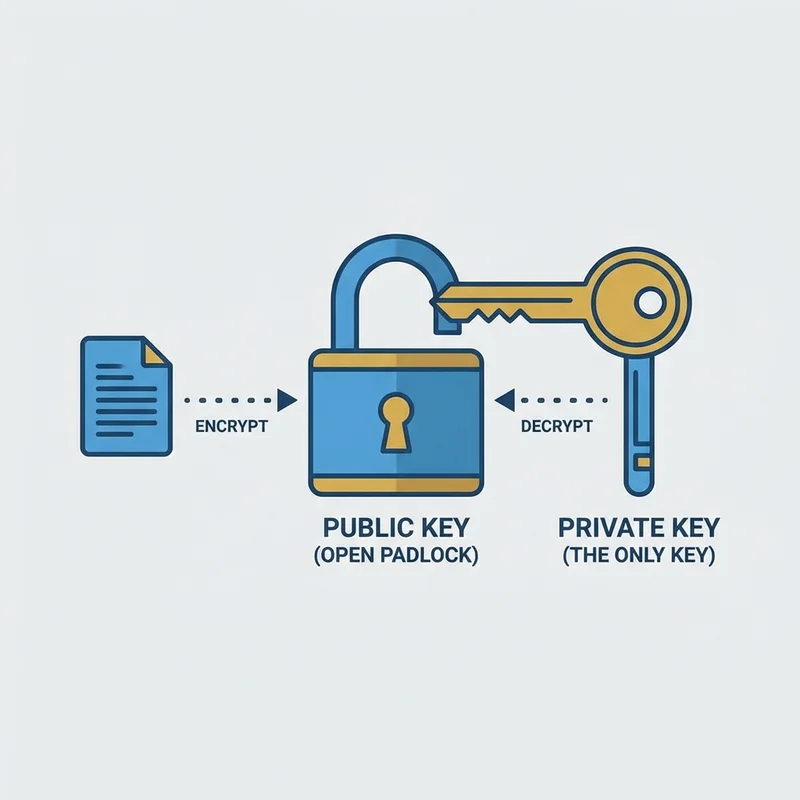
This separation allows for secure communication between two parties who haven't met before. Alice can send her padlock (public key) to Bob. Bob puts his message in a box, locks it with Alice's padlock, and sends it back. No one else can open it—not even Bob once it's locked—except Alice, who has the private key.
How RSA Works
The security of RSA relies on the mathematical difficulty of factoring large prime numbers. Generally, the process involves:
- Generating two very large distinctive prime numbers.
- Multiplying them together to create a massive number (the modulus).
- Deriving the public and private exponents through complex modular arithmetic.
Because breaking this encryption requires calculating the original prime factors from the massive product—a task that would take modern supercomputers millions of years—RSA remains a robust standard for security.

How to Generate an RSA Key
Generating an RSA key pair is standard practice for developers and system administrators. The most common tool for this is ssh-keygen on Linux and macOS, or PuTTYgen on Windows.
Using ssh-keygen (Linux/macOS/Windows Powershell)
-
Open your terminal.
-
Run the following command:
ssh-keygen -t rsa -b 4096 -C "[email protected]"-t rsa: Specifies the type of key to create (RSA).-b 4096: Specifies the key length in bits. 4096 is the current recommended standard for strong security.-C: Adds a comment (usually an email) to help identify the key.
-
The system will ask for a location to save the file. Press Enter to accept the default.
-
You will be prompted for a passphrase. This adds an extra layer of protection to your private key.
Once secure, you will have two files:
id_rsa: Your Private Key (Keep this safe!).id_rsa.pub: Your Public Key (Share this).

Common Use Cases
RSA keys are ubiquitous in the tech world. Here are a few places you definitely encounter them:
1. SSH (Secure Shell)
This is perhaps the most direct use case for developers. RSA keys allow users to log into remote servers securely without sending passwords over the network. The server holds the public key, and the user proves their identity by demonstrating possession of the private key.
2. SSL/TLS Certificates (HTTPS)
When you see the padlock icon in your browser's address bar, RSA is often responsible for the initial handshake that establishes a secure connection between your browser and the website.
3. GPG (GNU Privacy Guard)
RSA is used in PGP/GPG to encrypt emails and files, ensuring that only the intended recipient can read the contents.
4. Code Signing
Software developers use RSA keys to digitally sign their applications. This assures users that the software hasn't been tampered with since the developer released it.
Conclusion
Understanding RSA keys is the first step toward mastering digital security. Whether you are setting up a server or just wanting to understand how your data stays private, the concept of a public key for encryption and a private key for decryption is a cornerstone of the secure internet. Remember: keep your private key private, and use a strong passphrase!